Load Multiple Excel Files into Database
Open BIDS
Create new integration Service Project, create a new
package say “ImportMultipleExcelFiles.dtsx”
package say “ImportMultipleExcelFiles.dtsx”
1. Create a Folder ExcelFiles (C:\ExcelFiles)and then create multiple
Excel files in folder C:\ExcelFiles but make sure all Excel files have identical schema (format)
Excel files in folder C:\ExcelFiles but make sure all Excel files have identical schema (format)
Assuming all Excel files above contain data in worksheet “Sheet1”
with below schema
with below schema
City
|
Value
|
AY
|
2000
|
BY
|
3000
|
CY
|
4000
|
You can have your own sheet name but keep a note, worksheet
name has to be uniform across all Excel files that contains data to be uploaded.
name has to be uniform across all Excel files that contains data to be uploaded.
2. Right Click on Control Flow
Window, Select Variables
Window, Select Variables
Add a variable “FileName”
at Package Level having data type string
at Package Level having data type string
3. Go to Control Flow add a “For Each Loop Container” Component.
Right-click on the Foreach Loop container and select Edit.
Then, Click on Collection “Collection” tab. Assign folder path and file type as
shown below
Then, Click on Collection “Collection” tab. Assign folder path and file type as
shown below

Then go to “Variable
Mappings“ tab and map variable created above like
below
Mappings“ tab and map variable created above like
below

6. Drag a “Data Flow Task “inside
“Foreach Loop Conatainer”, double clickson Data flow task
“Foreach Loop Conatainer”, double clickson Data flow task
Drag one “Excel Source” task ,
double click on this to get “Excel Source Editor “ Window
double click on this to get “Excel Source Editor “ Window
Now choose new and new window will
open , now browse to your first excel file that isC:\ExcelFiles\First.xls
open , now browse to your first excel file that isC:\ExcelFiles\First.xls
Under “Name of the Excel Sheet” on “Excel
Source Editor “, choose Sheet1$
Source Editor “, choose Sheet1$
7. Now drag “OLE DB Destination”
task , connect “Excel Source” to “OLE DB Destination”
task , connect “Excel Source” to “OLE DB Destination”
Point this conenction to your database and create new table or use an existing table
Map both like below

8. Go to the Properties
of ”Excel Connection Manager”
of ”Excel Connection Manager”
Expand “Expressions”
Choose “Connection String” property and assign value of Expression like below
"Provider=Microsoft.Jet.OLEDB.4.0;Data Source=" + @[User::xls] +";Extended Properties=\"Excel 8.0;HDR=YES\";"
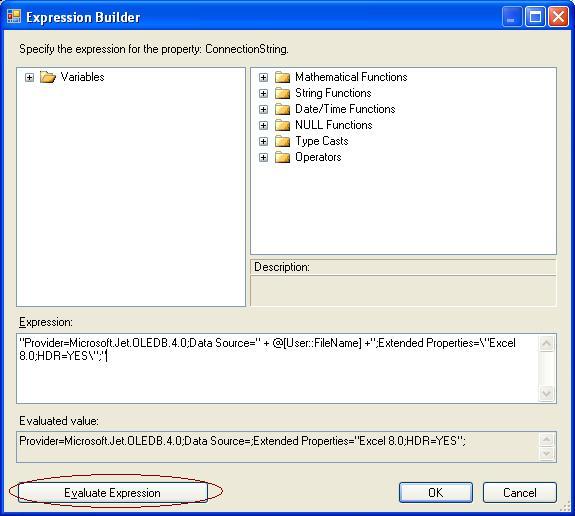
9. Click on button “Evaluate Expression” at the bottom left of above window to check for any errors
10.Set property DelayValidation=TRUE on the Data Flow task
10.Execute your Package

No comments:
Post a Comment